Which changes matter?
Use defined metrics and structured data to understand operations and identify important changes.

Decision LayerPerception & judgment
Data connections · Metric definitions
Metrics & trends
Business knowledge · Analysis procedures
Review causes & actions
Improvement & action plans
Human review & approval when needed (HITL)
Extend autonomous execution to validated workflows
See Claude use your company's metrics and analytical criteria to investigate a business question.
Decision Layer brings together the metrics, analytical methods, and criteria your team manages. MCP lets agents such as Claude call those tools.
Enable HC Semantic MCP in Claude to access your company's metrics and analytical tools.
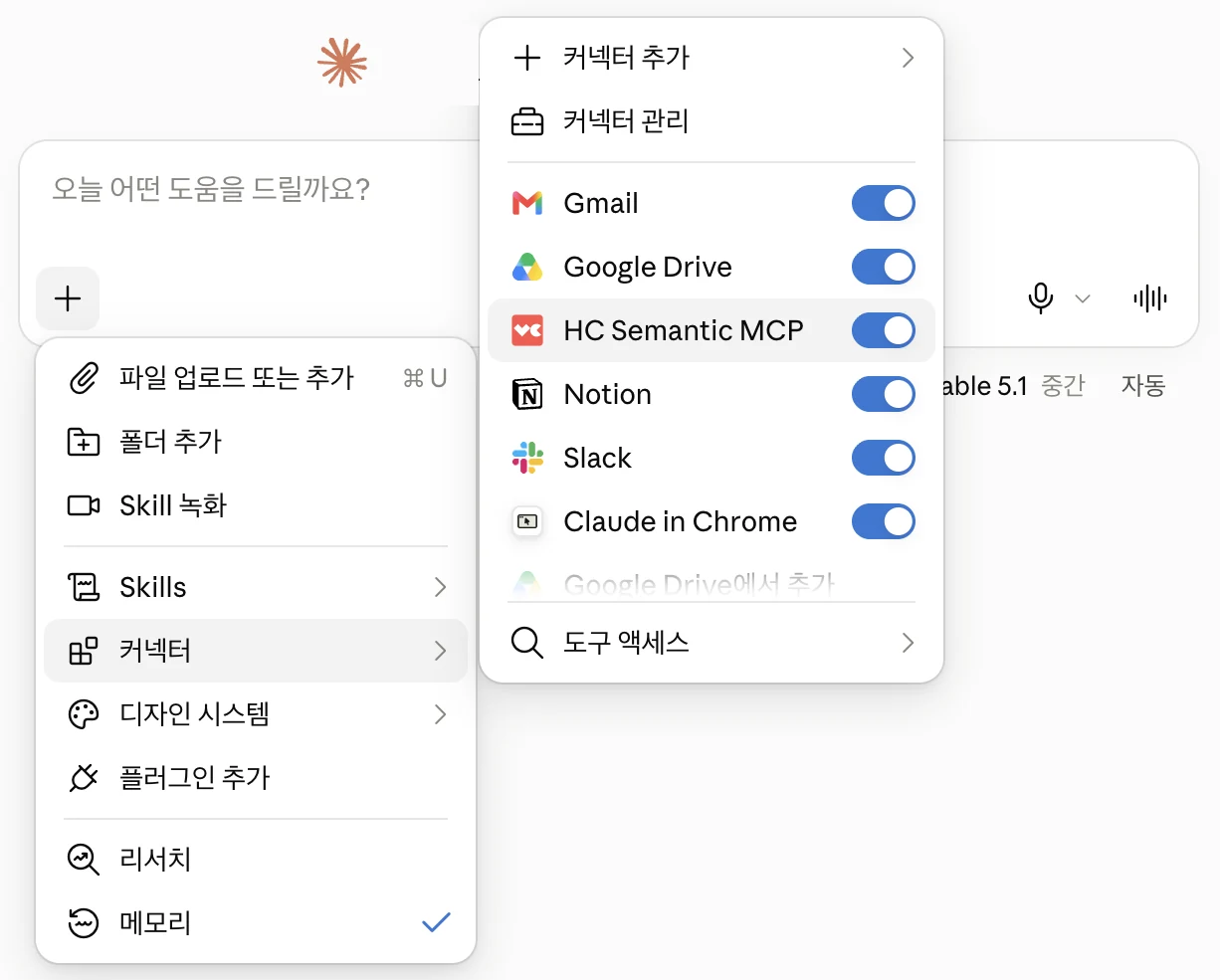
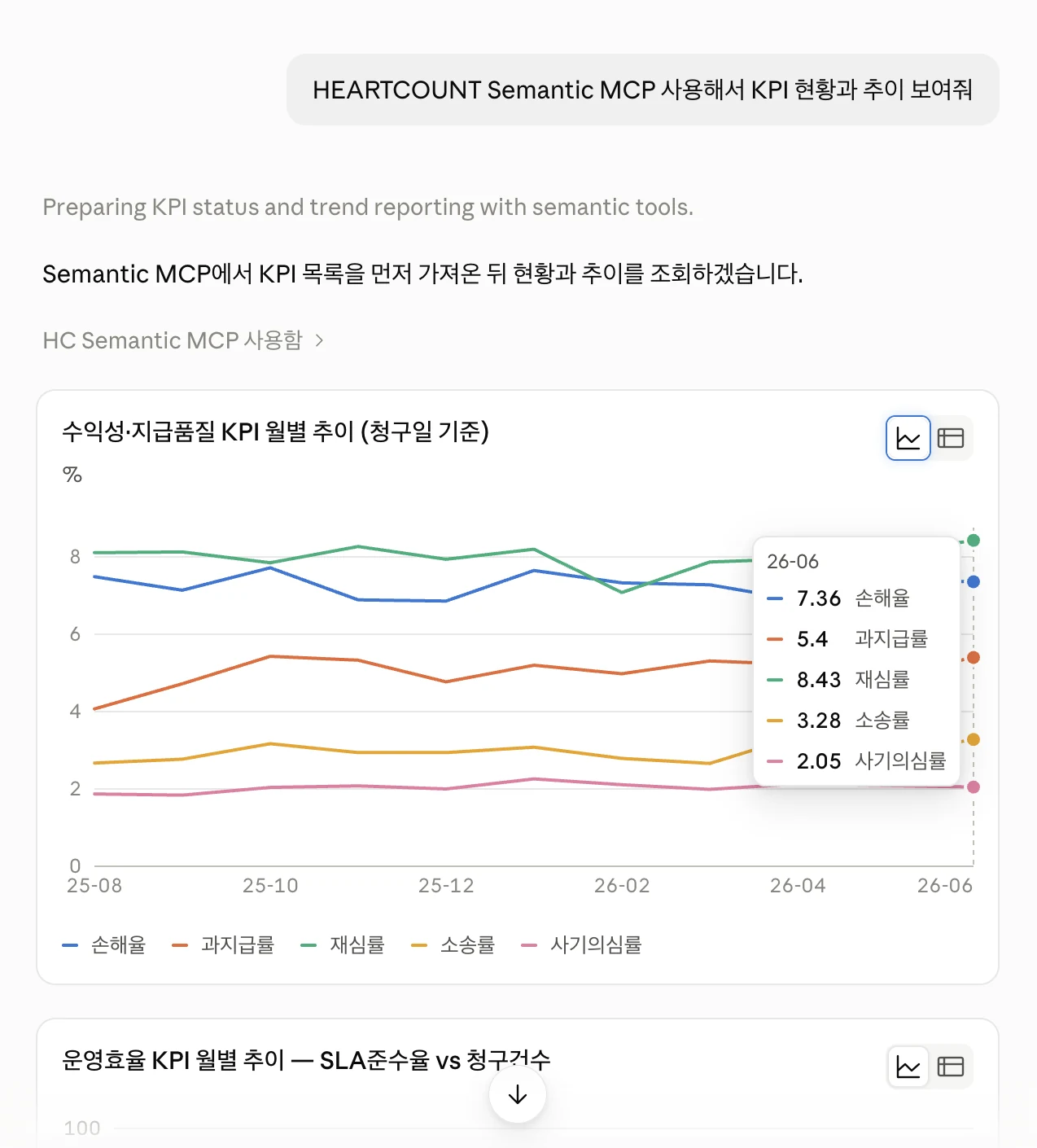
Query the KPIs your company defines and see monthly changes in charts and numbers.
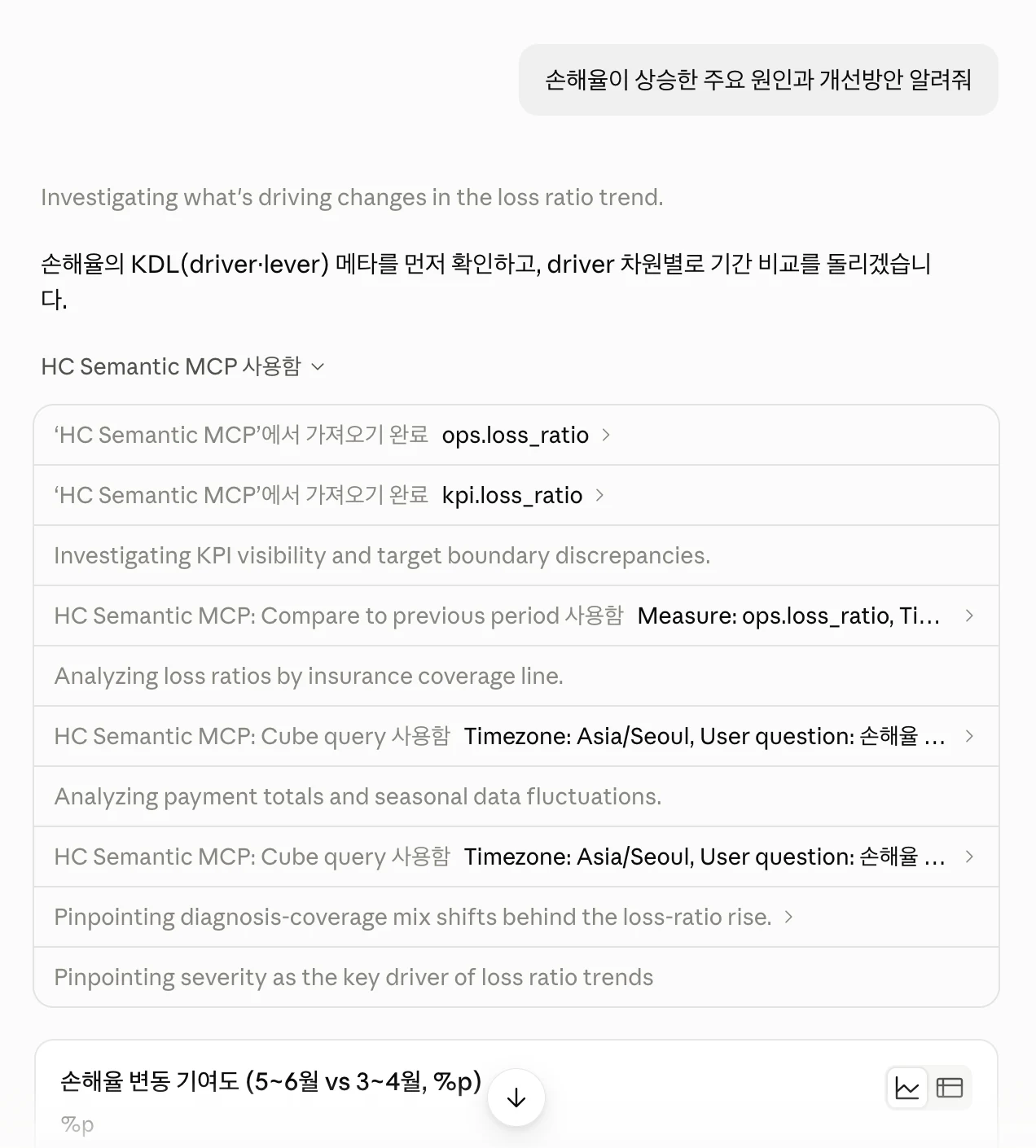
Ask what changed a KPI and how to improve it. The agent uses Decision Layer tools to run the analysis.
Compare contributions to the change with coverage-level figures to identify what needs further review.
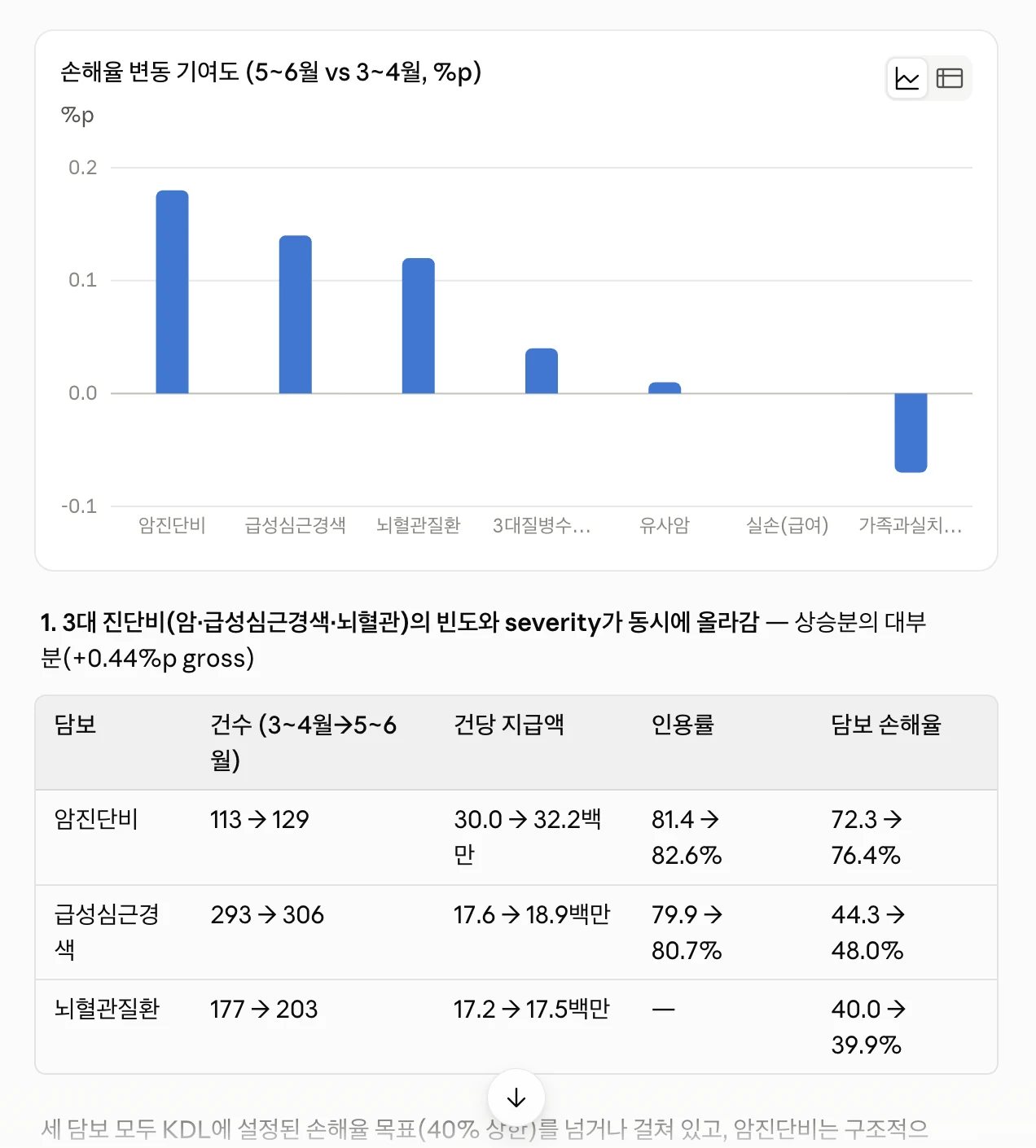
Actual Claude screenshots using synthetic insurance data. The interface shown is Korean; Claude is one example of an agent connected through MCP.
The AI we're building
Business work moves from understanding a situation to making a decision and taking action. AI needs to understand your company's data and operating context, then apply the right criteria and methods.
Use defined metrics and structured data to understand operations and identify important changes.
Draw on business knowledge, experience, analytical procedures, and comparison criteria to review possible causes and responses.
Connect actions reviewed and approved by people to business systems, then verify the results.
Industry applications
Investigate manufacturing quality, claims overpayments, GPU capacity, or customer-service friction.
See how data and expert judgment can help a team decide what to do next.
Trace every unit that shared the suspect process conditions, including products that passed inspection. Review possible causes, the affected production, and the next steps for the factory.
Investigate recurring overpayments by claims handler and high-value individual claims. Distinguish ongoing review candidates from cases needing an audit, then prioritize the next checks.
Investigate idle GPUs, queued jobs, and bottlenecks to identify possible resource changes. This scenario shows how the planned Always-on Decision Agent could report opportunities while respecting service commitments and operating constraints.
Find the service segments driving a rise in handle time, then inspect transcripts, chat, and customer feedback for repeated friction. Evaluate practical improvements with both metrics and conversation evidence.
Illustrative industry applications. Data and decision criteria are configured for each organization. The Always-on Decision Agent and approval and execution interfaces are planned for open-source release.
Set up data connections and analytical procedures in advance, so each analysis doesn't start from scratch.
Let teams and multiple agents reuse the metrics, comparison criteria, and analytical procedures defined by experts.
See which data and methods were used, and assess whether the findings hold up.
Build it together. Put it to work.
Use your existing semantic layer, then connect business knowledge, analytical procedures, and decision criteria. Help agents and business apps analyze and make decisions using the same metrics and criteria.
Review and test existing Python analytics, forecasting routines, or model inference, then register them as Methods. Code drafted with AI coding tools can follow the same process.
Analysis method · Method
Save analysis steps and selection rules as a Recipe. You can also explore with registered Methods first, review a useful Run, and save its procedure for later use.
Analysis procedure · Recipe
Each analysis execution creates a Run. Inspect its inputs, selected path, Method and Recipe versions, queries, results, and validation records.
Analysis run record · Run
Metric calculations use structured data and defined formulas. Document retrieval and other unstructured sources are configured in the agent or application to supply relevant context and constraints.
Decision Layer
Analysis method MethodAnalysis procedure RecipeAnalysis run record Run
Decision Graph describes the analysis and decision structure; Methods, Recipes, and Runs are the framework’s concrete components. Connected external systems carry out business operations and equipment control.
Decision Graph describes the expert’s analysis and judgment flow. In the framework, a Recipe combines Methods into an analytical procedure, and a Run records analysis execution and validation. Asking for clarification during analysis is separate from approving an operational action.
Confirm semantic-layer connectors and integration scope for your environment. Web, Python, REST, and MCP use the same analysis execution model.
Available in the Web UI
Start with metrics defined in your semantic layer. Combine analytical methods and selection rules into a Recipe, then run it on a new period and review the results.
Connect a semantic layer, then inspect metric definitions and units in the catalog. Choose a metric to start building a Recipe.
Connections → Metric catalog
This example uses a Cube connection. Metric formulas and data permissions remain with the connected semantic layer.
Metric definition
Completed-order product sales after discounts. Excludes tax and delivery charges.
Choose a metric → Create a Recipe
Choose a registered Method to compare periods or investigate groups. Your own Python analysis can join the same workflow once it has been reviewed, tested and registered as a Method.
Methods → Inputs and outputs
Registering a custom Method currently requires development code and configuration. The Web UI lets you inspect and select methods that are already registered.
query.trendCompare a metric and related metrics over time
query.drilldownInvestigate product groups, regions and customers
Registered through development code and configuration
Choose the metric and methods, then connect the steps. A Recipe can pass the selected product group into a regional comparison, preserving the rule for what to investigate next.
Recipes → Edit procedure
Use the visual editor to compose steps and inspect the Recipe code. Save the procedure to run it again for another period.
Monthly trend
Compare product groups
Regions within the selected group
Customers within the selected region
Check units, prices and discounts
Pass the selected group to the next step
Where should we investigate a revenue decline first?
View Recipe codeSet the analysis period and run the saved Recipe. Review the groups selected, key findings and step results to decide what your team should examine next.
Run a Recipe → Analysis run history
These are synthetic-data results. The run identifies differences in period length and interpretation limits; it does not establish causation or a business improvement.
April 2026 · retail-revenue-change v1.0.0
Investigation target selected from this period’s data
| Metric | March | April |
|---|---|---|
| Revenue | ₩6.48M | ₩5.04M |
| Units | 120 | 120 |
| Discount rate | 10% | 30% |
Unit sales held steady while the discount rate rose.
Step results · Settings · Queries · Sources
From analysis to business change
Claims delays, inventory, and manufacturing quality call for different expertise. We are extending the same framework from reviewing evidence and proposed improvements to requesting approved actions and verifying outcomes.
Every industry needs to define the desired outcome, respect operating constraints, and assess possible actions. Decision Layer is evolving as a common framework for that process.
We are developing a common interface for sending approved requests and receiving status and results from existing systems. Each deployment needs connectors and permissions suited to those systems.
Create review tasks or request an approved team handover.
Claims and work assignment systemsRequest an approved purchase order or stock transfer.
Order, inventory, and purchasing systemsRequest reinspection, work allocation, or approved operating-setting changes.
MES and equipment control systemsExisting systems handle business transactions, fast equipment control, and safety. Your team reviews execution results and business outcomes to inform the next decision.
Approval and execution interfaces are planned for open-source release. Connectors for specific systems, such as an MES or claims platform, are configured during implementation.
Value across the team
Business & operations
Bring the performance questions and judgment criteria your team uses. Review the findings and evidence to decide what deserves further attention.
Data & AI teams
Connect the metrics and reviewed code you already maintain, so multiple agents and applications can use the same procedures.
Partners & builders
Add industry methods and business rules to the common framework. Build agents and applications that work with the customer’s data and operational systems.
Current capabilities and planned releases
The planned agent will investigate important metric changes without waiting for a question. Approved actions can then become execution requests. Your team reviews completion and performance before refining the criteria for future analysis.
The Always-on Decision Agent and approval and execution interfaces are planned for open-source release. They are not part of the current public framework. Automation expands only after an action’s scope and impact have been validated.
Planned open-source release
What if your team knew before asking?
In development: investigate important changes in business metrics and report possible causes and improvements. Run saved procedures around data refreshes or reporting cycles, selecting findings by business impact and supporting evidence.
Assess the size of a change, business impact, and the available data against agreed criteria. The aim is to record routine changes and reduce repeated alerts about the same issue.
Follow expert review steps to examine possible causes and affected areas. Go beyond a threshold alert by preparing the evidence the team needs to decide what to do.
Bring the change, possible causes, evidence, and proposed actions to a team channel or agent app. Once a responsible person approves an action, the next step is an execution request to the connected operational system.
Schedules, thresholds, and rule changes are configured for each operation and approved by a responsible person. External agents can also call Decision Layer procedures on a schedule.
Planned open-source release
How does an insight become operational change?
We are developing interfaces to request approved actions in existing business and equipment systems and track status and outcomes. A responsible person reviews the results before updating analysis and reporting criteria.
Check goals, constraints, and permissions before requesting an action that a responsible person has approved.
Distinguish an accepted request from completed work. Record failures and interruptions for the team to review.
Review changes in target metrics after the action. Successful execution and improved performance require separate checks.
Automate only under explicit conditions, starting with tasks whose scope and effects have been verified.
A shared interface for approvals, requests, status, and results is planned for release. Connectors for individual systems are configured during implementation.
Start with your business
Choose a business problem where understanding the cause takes too long or the team keeps repeating the same analysis. We can discuss the scope without confidential data.
Define the question and target metric: revenue, cost, processing time, quality, or another business priority.
Bring the data, metric definitions, analytical methods, and operating knowledge your team uses today.
Agree on the actions the team would review and who would decide. Identify any business systems you may want to connect in the future.
Define the question and review criteria, then use a proof of concept to evaluate fit and impact with your data and workflows. Scope approval and execution integrations separately, including the target systems and permissions.
Before you get started
Start with a performance question: why revenue changed, where processing slowed, or which conditions coincide with a quality issue. The current framework executes procedures defined by your team. The industry reports illustrate possible applications and are not connected to live customer data.
An agent needs your metric definitions, comparison criteria, and investigation order as well as coding ability. Register reviewed code as Methods and save the procedure as a Recipe for reuse on fresh data. AI tools can help draft that code, but the team still needs to assess whether the data and method fit the business question.
Decision Layer manages reusable analytical capabilities, procedures, and analysis execution records. An agent requests the right analysis for a question or monitoring condition and explains the findings. The Always-on Decision Agent and approval and execution integrations are in development. Using them in an organization requires its data, systems, and decision criteria to be configured.
Yes. Connect a supported semantic layer and register reviewed Python analytics, forecasting routines, or model inference as Methods. Required code, libraries, and model artifacts must be installed and tested in the execution environment.
Inspect the analysis inputs, selected groups, queries, results, and validation records. Check that the comparison and assumptions fit the question. An observed association is evidence to investigate; it does not by itself establish a cause or prove that a proposed action will improve performance.
Documents, policies, and operating notes help explain circumstances and constraints. The agent or application connects these materials. Metric calculations use structured data and agreed definitions.
The Always-on Decision Agent is in development and planned for open-source release. It is designed to run analyses on a schedule or after data changes, then brief your team on important metric changes, possible causes, and proposed improvements. A proof of concept can validate its fit and impact using your data and workflows before adoption.
Interfaces for approvals, execution requests, status, and results are planned for open-source release. Actions are sent to existing business or equipment systems only after human approval. System connectors, permissions, and approval conditions are configured during implementation. Existing systems handle execution, equipment control, and safety. Automation expands within explicit limits after its effects have been validated.
Decision Layer encompasses the Semantic Layer and Decision Graph. It uses your existing metric definitions and connects the team’s business knowledge, analytical procedures, and decision criteria. Agents and business apps access these capabilities through Semantic MCP.
Connect data and metric definitions, configure methods and the runtime, and set up authentication and permissions for data and analytical assets. Current use is local or in an isolated environment. A shared service requires separate user identity and execution isolation arrangements, with validation before use.
Follow the GitHub quickstart to install the Python package and try the public retail dataset demo with Docker running. The current Apache 2.0 release covers metric queries, Method and Recipe execution, Run records, and calls from agents and applications. The Always-on Decision Agent and approval and execution interfaces are planned for open-source release. Organization-specific data, criteria, and connectors are configured separately.
Tell us which performance change you want to understand and what your team needs to decide next.
Decision Agent solution (Korean)